
No, ShipStation does not support EDI natively, but it can be integrated using third-party EDI providers.
Blog
ShipStation EDI Integration: A Complete Guide to Automation
 Cogential IT
Introduction
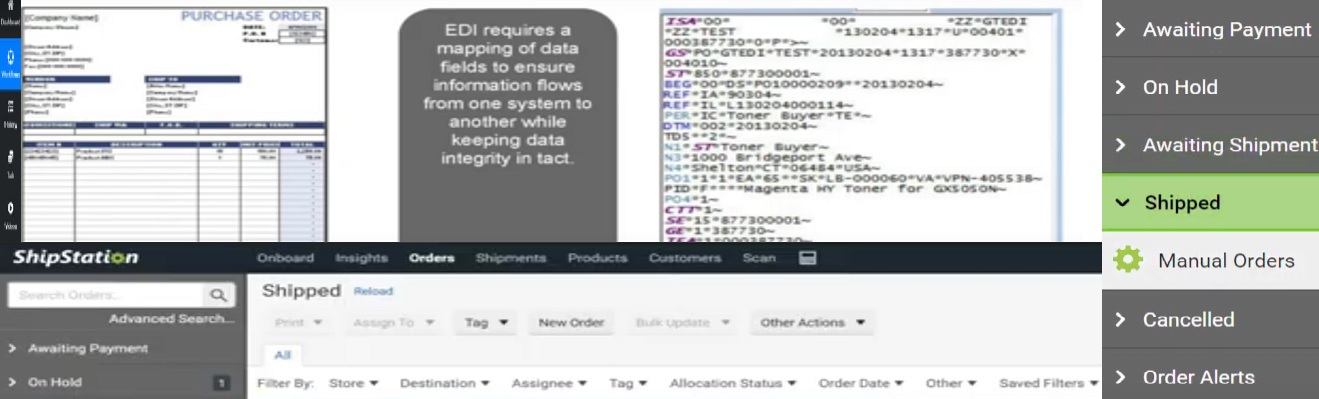
ShipStation EDI Integration allows businesses to streamline their order fulfillment by seamlessly connecting Electronic Data Interchange (EDI) with ShipStation. EDI enables automated communication between trading partners, eliminating manual data entry and reducing errors. This guide will explore how to integrate ShipStation with EDI, its benefits, and best practices.
What is EDI?
EDI (Electronic Data Interchange) is a standardized format for exchanging business documents electronically. It is widely used in supply chain management to transfer orders, invoices, and shipping notices between trading partners.
Why Integrate ShipStation with EDI?
Integrating ShipStation with EDI helps automate order processing, ensuring seamless data exchange between suppliers, warehouses, and customers. Key benefits include:
- Efficiency: Automates order imports, label generation, and tracking updates.
- Accuracy: Reduces human errors in data entry.
- Speed: Faster order processing and shipping.
- Scalability: Supports growing business operations.
- Compliance: Meets industry-standard EDI requirements.
Key Components of ShipStation EDI Integration
1. EDI Transaction Sets
- EDI 850: Purchase Order
- EDI 855: Order Acknowledgment
- EDI 856: Advance Ship Notice (ASN)
- EDI 810: Invoice
- EDI 940: Warehouse Shipping Order
2. Mapping EDI Data to ShipStation
- EDI documents must be converted into ShipStation-compatible formats.
- Orders are mapped to ShipStation’s API endpoints.
- Shipping details are updated automatically based on EDI data.
3. Middleware for EDI Processing
- An EDI translator is required to convert raw EDI files into ShipStation-readable formats.
- Middleware providers such as SPS Commerce, TrueCommerce, and Cleo Integration Cloud bridge the gap between ShipStation and EDI.
How to Integrate ShipStation with EDI
Step 1: Choose an EDI Provider
Select an EDI provider that supports integration with ShipStation. Popular providers include SPS Commerce, TrueCommerce, Babelway, and DiCentral.
Step 2: Configure ShipStation API
ShipStation provides a REST API that allows businesses to import orders, create shipments, and update tracking information.
Step 3: Set Up EDI Data Mapping
EDI documents must be mapped to ShipStation’s API endpoints:
- EDI 850 (Purchase Order) → ShipStation Order Import API
- EDI 855 (Order Acknowledgment) → ShipStation Order Status Update
- EDI 856 (ASN) → ShipStation Shipping Notification
- EDI 810 (Invoice) → Accounting Software Integration
Step 4: Automate Data Exchange
Use an EDI middleware to automate the data flow between ShipStation and your ERP, warehouse, or supplier systems.
Step 5: Test and Deploy
Perform end-to-end testing with your trading partners before going live. Validate EDI transactions to ensure they meet compliance standards.
Best Practices for ShipStation EDI Integration
- Use Cloud-Based EDI Solutions: Cloud-based EDI providers offer better scalability and real-time data exchange.
- Automate Order Processing: Reduce manual intervention by leveraging ShipStation’s automation rules.
- Monitor EDI Transactions: Regularly check for errors in EDI documents to avoid processing delays.
- Maintain Compliance: Follow industry-specific EDI guidelines to ensure smooth operations.
Common Challenges and Solutions
| Challenge | Solution |
|---|---|
| Data Mapping Issues | Use standardized EDI templates to map data correctly. |
| API Rate Limits | Optimize API calls and batch process orders. |
| Trading Partner Compliance | Work with EDI providers to meet partner-specific requirements. |
| Order Processing Delays | Automate workflows to reduce manual dependencies. |
Conclusion
ShipStation EDI Integration is a game-changer for businesses looking to optimize their shipping and fulfillment processes. By leveraging EDI, companies can automate order management, reduce errors, and improve operational efficiency. Implementing the right EDI solution and following best practices will ensure seamless integration with ShipStation.
? Need Help with ShipStation EDI Integration?
If you need assistance with integrating EDI into ShipStation, consult with an EDI specialist or choose a trusted EDI provider to streamline your operations.
| ? Did you find this blog helpful? Share it with others who might find it valuable! |
| ? Contact Us: +1-877-840-6546 | Get in Touch Today! |
Frequently Asked Questions
Does ShipStation support EDI natively?
How much does it cost to integrate EDI with ShipStation?
What are the best EDI providers for ShipStation integration?
How long does it take to set up ShipStation EDI integration?
Can ShipStation handle dropshipping via EDI?
Discussion & Questions (0)
Free checklist
Get the Industry EDI Compliance Checklist
Use this checklist to prepare your Industry EDI workflow before onboarding.
Document readiness checks
ERP and system integration planning
Testing and go-live support checklist
Exception and acknowledgment monitoring
Leave a Comment