
NetSuite EDI Integration And ASN 856 Automation
 Cogential IT Editorial Team
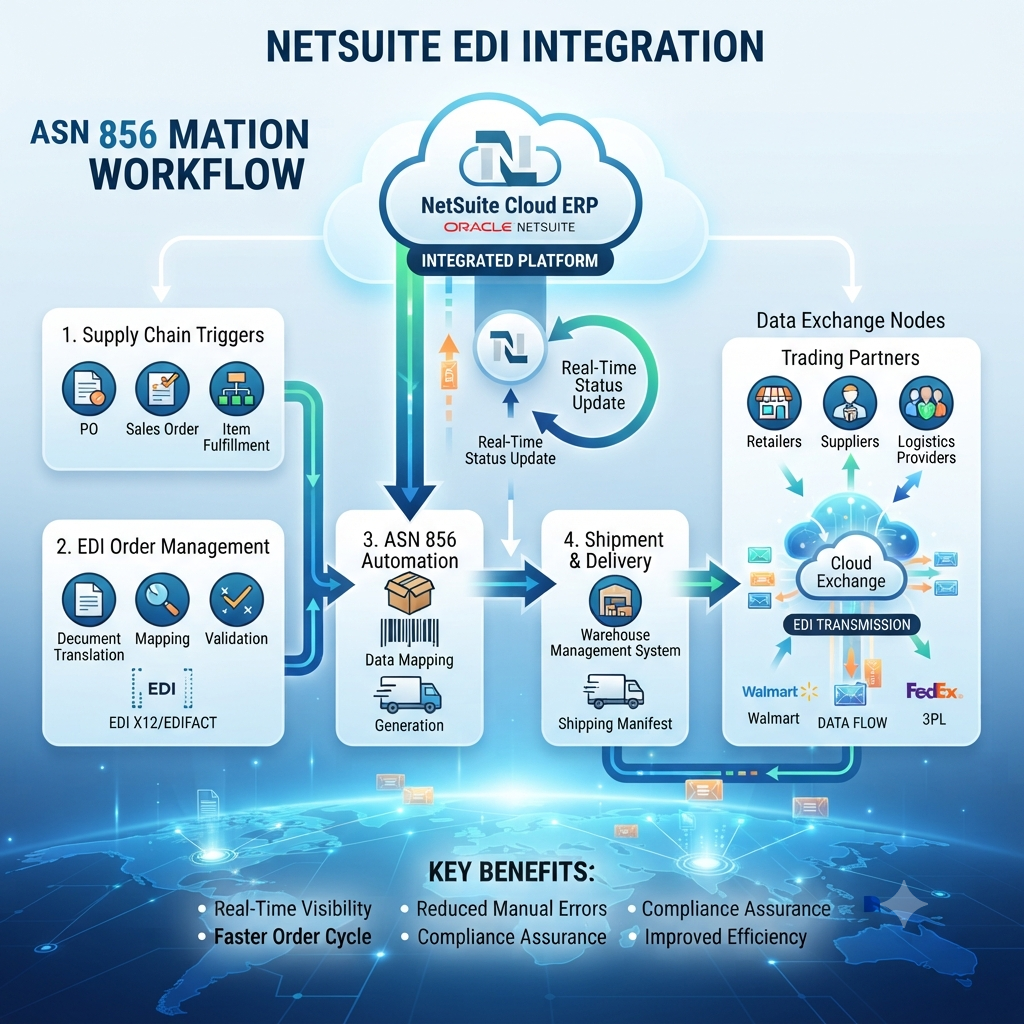
The Question Behind Every NetSuite ASN Headache
Why does my NetSuite item fulfillment not automatically trigger an EDI 856 ASN to my retailer? If that question is in your search bar, you are not alone. Every week we talk to operations teams who ship orders in NetSuite, then spend the next morning copying tracking numbers and carton counts into a separate EDI portal. They assume NetSuite already has the data, so the ASN should just happen. It does not. NetSuite records the physical fulfillment beautifully, but the EDI message is a different document with its own grammar, hierarchy, and timing. Turning one into the other is exactly what B2B EDI integration is for, and it is the heart of any NetSuite integration that ships to retailers.
If you are staring at chargebacks for late or mismatched ASNs, the culprit is rarely the pick itself. It is the gap between a NetSuite item fulfillment and a compliant 856 ASN. Let us tear down the myths that keep that gap open.
What an ASN 856 Really Is
The 856 ASN — Advance Ship Notice — is the message that tells your buyer what shipped, when it left, how it was packed, and what tracking to expect. Think of it as a shipping announcement with a strict outline: shipment level, order level, packaging level, item level. Each level is a hierarchy loop in the EDI file. Your retailer uses it to plan dock appointments, receiving labor, and invoice matching.
NetSuite's native Item Fulfillment record is the source of truth for most of that data, but it is not the ASN. It does not know whether your buyer wants carton-level detail, pallet-level detail, or serial shipping container codes. It does not know whether the ASN must arrive before the truck, within two hours of departure, or by 8 a.m. the next day. Those rules live in your trading partner's EDI specification. That is why a real NetSuite ASN 856 workflow needs mapping, validation, and a dispatch trigger, not just a saved search.
Five Myths About NetSuite ASN Automation
Over the years we have seen the same assumptions collapse projects. They sound reasonable, but each one hides a real cost.
Myth 1: NetSuite Already Sends the ASN When You Click Ship
NetSuite creates an Item Fulfillment. That is an internal record. The 856 ASN is an outbound EDI transaction. The connector has to read the fulfillment, reshape it into HL loops, add carrier SCAC and tracking, and route it through your VAN or AS2 endpoint. Without that connector, your buyer receives silence.
Myth 2: Item Fulfillment EDI Is Just a Template You Fill In
It is closer to a contract. Every element has a partner-specific meaning: the QTY segment, the MAN segment for carton IDs, the REF segment for purchase order and store number. One buyer's valid is another's reject. Templates help, but they do not replace a mapping engine.
Myth 3: One ASN Spec Fits Every Retailer
Major retailers each publish their own 856 guidelines. Some want an HL hierarchy with carton-then-item; others want pallet-then-carton-then-item. Some want UCC-128 labels; others want SSCC-18. If you ship to more than one major retailer, you need more than one map. This is why item fulfillment EDI projects start with a partner spec review, not with code.
Myth 4: NetSuite Warehouse Packaging Is Too Chaotic to Automate
This is the myth that hurts the most. NetSuite warehouse packaging looks chaotic because cartons get split, items get mixed, and pallets change at the dock. But if you capture carton contents at the pack station — even with a simple scan-to-carton workflow — you have enough data to build the ASN packaging hierarchy automatically. The chaos is not the problem; the missing scan is.
Myth 5: ASN Errors Are Just EDI Noise
A rejected ASN is not a footnote. It is a dock appointment that cannot be checked in, a purchase order that stays open, and eventually a chargeback on your next invoice. Retailers treat ASN accuracy as part of the fulfillment scorecard. That is why item fulfillment EDI should include validation before dispatch.
What the ASN 856 Is Actually Built From
Before you can automate, you have to see the skeleton. Here is what an ASN 856 is built from.
Each branch becomes an HL loop in the X12 file. The mapping job is to decide which NetSuite field feeds each branch, and in what order your retailer wants them.
The Right Way to Automate ASN Dispatch From NetSuite
Instead of exporting CSVs or retyping portals, build a closed loop. Here is the typical flow we implement with our NetSuite integration clients. The same logic applies whether you run NetSuite, SAP, or Infor M3; see our ERP integration and Infor M3 guides for comparison.
Manual ASN Work Versus an Integrated NetSuite ASN 856
Here is how the two approaches actually compare day to day.
| Area | Manual ASN work | Integrated NetSuite ASN 856 |
|---|---|---|
| Data capture | Copy from NetSuite, paste into portal | Scan-to-carton writes package lines |
| Packing hierarchy | Rebuilt from memory or photos | Built from live NetSuite packages |
| Validation | Eyeball check before send | Partner-specific rule engine |
| Dispatch timing | Batch file, usually next day | Event-triggered on ship |
| Error cost | Chargebacks, refused receipts | Near-zero after spec tuning |
Where NetSuite Warehouse Packaging Meets the ASN 856
The ASN does not start in the EDI translator. It starts on the warehouse floor. Here is how NetSuite warehouse packaging feeds the 856.
Every package line and tracking number in the Item Fulfillment can become an HL loop. The trick is making sure the pack station captures the carton-to-item relationship in real time, not after the truck leaves.
When to Automate, and When to Pump the Brakes
- You ship to big-box retailers with strict ASN rules
- You process more than a few hundred fulfillments a month
- Your pack station already scans items into cartons
- You want real-time chargeback reduction
- You have one low-volume partner with no ASN SLA
- Your packing data is not captured yet
- You have not locked the partner spec version
- Your team cannot own exception handling yet
Mistakes We See After Go-Live
Even after the integration is live, teams slip. They start shipping from a new warehouse but forget to map the new location code. They add a new carrier and skip the SCAC mapping. They reuse last year's holiday spec after the retailer publishes a new version. The fastest way to find these problems is to monitor your 997/FA acknowledgments and your retailer scorecard every week.
If your internal team is stretched thin, you do not have to own the mapping engine. Managed EDI services or cloud EDI solutions can run the connector, map updates, and partner onboarding for you.
If your trading partner cannot tell you their EDI spec version on the first call, expect surprises later.
Putting It Together
NetSuite EDI integration does not magically create ASNs. It closes the loop between your warehouse floor and your buyer's receiving dock. When item fulfillment EDI is mapped correctly, the NetSuite ASN 856 leaves NetSuite as soon as the truck does, with the right hierarchy, the right tracking, and the right partner spec. That is when chargebacks drop and receiving appointments stop getting refused.
If you are ready to stop retyping carton counts into portals, talk to our integration team about your NetSuite ASN 856 workflow.
— Cogential IT Editorial Team, Integration Consultant, Cogential IT
Frequently Asked Questions
Discussion & Questions (0)
Get the Industry EDI Compliance Checklist
Use this checklist to prepare your Industry EDI workflow before onboarding.
Leave a Comment